 FarsiVid Latest Tech News & Tutorials


The Google One VPN feature provides users with a secure and private connection to the internet.
Read More »
The Google One VPN feature provides users with a secure and private connection to the internet.
Read More »
Learn how to install Windows 11 on any device by following these simple steps.
Read More »
Learn how to partition an SSD in Windows 11 with this step-by-step tutorial. Follow our guide to create multiple sections, organize your files and keep your data separate.
Read More »
An image showing an Android phone with the Settings app open and a finger tapping on the "Build Number" section.
Read More »
In this step-by-step tutorial, we guide you through the process of uninstalling apps from your Android device using ADB (Android Debug Bridge). With ADB, you can quickly and easily uninstall apps without navigating through the settings menu. We provide clear instructions on installing ADB and the necessary drivers, connecting your device to your computer, finding the package name of the app you want to uninstall, and finally, uninstalling the app with ADB. This tutorial will save you time and effort when managing apps on your Android device.
Read More »
With Quickemu Run Windows 11 and macOS within a Linux OS!
Read More »
Learn how to play classic games on Linux with RetroArch, a free and open-source frontend for emulators, game engines, and video games. This versatile platform allows you to play games on various systems such as Arcade, Atari, Commodore, DOS, GBA, PSP, and more, all in one window. Installing RetroArch is straightforward and can be done through your system package manager or the universal Flatpak package. Once installed, you can easily download and install the cores and content required to play your desired games. Simply navigate to the “Main Menu” and select “Online Updater” to get started. RetroArch also offers various options to customize your gaming experience, including controller profiles, cheats, database, overlays, GLSL shaders, and more. Get ready to take a nostalgic trip down memory lane with RetroArch on Linux.
Read More »
GPU thermal throttling is a technique used by graphics cards to avoid overheating and potential damage. When a GPU reaches a certain temperature, its clock speed is lowered to reduce heat output, which can affect performance. Understanding thermal throttling and its causes is important for PC gamers and users who want to optimize their GPU usage and avoid hardware problems.
Read More »
"Linux commands can be a powerful tool to automate tasks and improve your workflow. This article lists 50+ essential commands to help you master Linux and become more productive.
Read More »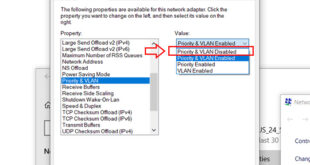
Windows 11 users can connect to both Ethernet and Wi-Fi simultaneously, but the operating system typically prioritizes one connection over the other. By default,
Read More »