Updated September 8, 2026 · By Ryan Bold
ADB can remove an Android app from a connected device, but Settings is the simpler choice when an ordinary Uninstall button is available. Use ADB when you need a controlled, explicit package operation—not a bulk “debloat” list copied from another phone.
App removal can erase local data or disrupt the device. Back up anything you need, and do not remove system components, the launcher, account services or management software you cannot confidently identify.
Prepare and identify the device
Install Google SDK Platform-Tools, then enable USB debugging. Connect a data cable, unlock the phone and authorize your own computer.
adb devicesContinue only when the intended serial number shows device. If several devices are listed, use adb -s SERIAL for subsequent commands, replacing SERIAL with the intended device. In PowerShell opened inside the Platform-Tools folder, you may need .\adb.exe instead of adb.
Identify the exact package
adb shell pm list packages -3This lists third-party packages. An app’s display name and package identifier are not necessarily the same. Cross-check the identifier with the app’s trusted store listing or developer documentation. If you cannot establish the match, stop and use the phone’s app settings.
Understand the operation before running it
| Command | Meaning |
|---|---|
adb uninstall com.example.app |
Uninstall that package; its app data is normally removed |
adb shell pm uninstall --user 0 com.example.app |
Remove it for user 0; not necessarily from every profile or the system image |
com.example.app is a placeholder, not a package you should blindly remove. User 0 is commonly the primary user, but phones may have work profiles or additional users. Inspect the setup rather than assuming every visible app belongs to user 0. The optional -k flag retains data/cache; it is unsuitable if your purpose is to clear the app’s data.
The command behavior and package-manager options are documented in Android’s ADB reference.
A cautious removal workflow
- Write down the app name, package identifier and intended user.
- Export or synchronize the app’s important data using its own supported process.
- Remove one app, read the result and check the phone.
- Confirm that the app is absent from the intended profile and that calls, settings and your usual apps still work.
This one-at-a-time approach provides a useful troubleshooting boundary. If ten packages are removed together and the launcher stops working, it becomes much harder to identify the cause.
Check the Android user before choosing a command
adb shell pm list users
adb shell am get-current-user
These inspection commands help distinguish the device’s users from the profile you happen to see on screen. A work profile can have its own user ID. Do not turn the primary-user example into an instruction to remove a work-managed app.
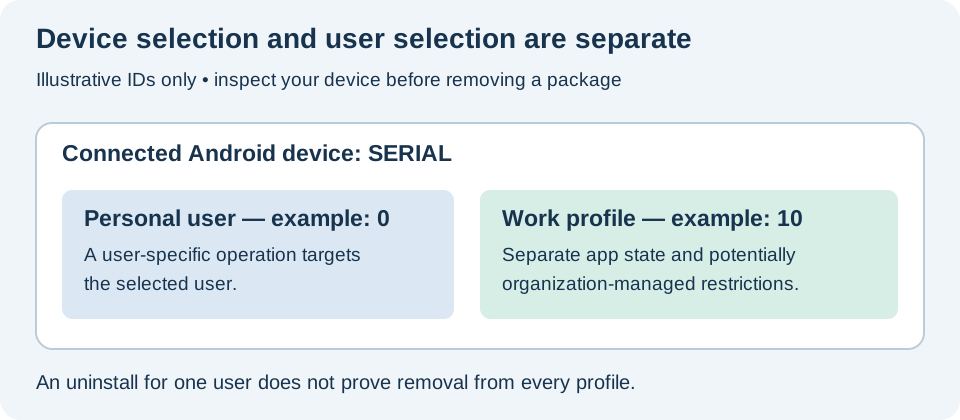
Here is an inspection-only pattern for a device whose serial is SERIAL and whose confirmed target user is 0:
adb -s SERIAL shell pm list packages --user 0 -3
adb -s SERIAL shell pm path com.example.app
Replace the placeholders. The second command reports package paths when available; a returned path alone does not prove that the package is safe to remove. Keep the same serial selector on any later removal command. After removal, repeat the package listing for the same user and check the device UI. A successful command for one profile does not establish that the app disappeared from every profile.
Errors and recovery limits
Unauthorized: check the unlocked phone for the debugging prompt. No device: try a known data cable and check the appropriate USB driver. Failure: read the full message; device policy or package state may prevent the operation.
A package that remains on the device may sometimes be restored for a user with adb shell cmd package install-existing --user 0 com.example.app. This is not a recovery guarantee and does not restore erased app data. For an ordinary downloaded app, reinstall from its trusted source and restore its own backup if available.
Finish by disabling USB debugging and revoking computer authorizations you no longer need.